If you’ve been following my recent posts on agentic DevOps, you know I’m a big believer in letting AI handle the repetitive parts of infrastructure reviews. But here’s the thing - most teams are still doing manual PR reviews for Bicep (and Terraform) files, catching the same anti-patterns over and over: “Hey, you forgot to enable HTTPS-only on that storage account.” “This VM SKU is way oversized for a dev environment.” “Did you check if this violates our naming conventions?”
It’s not that people don’t care. It’s that humans (and Peter for sure, I blame the age…) are terrible at remembering 47 different Azure best practices while also checking if the indentation is correct and the variable names make sense.
So over the last few days, I experimented with building a custom GitHub Copilot agent that reviews Infrastructure as Code pull requests specifically for Azure anti-patterns, cost red flags, and security misconfigurations. It integrates with Azure Policy definitions and the Well-Architected Framework pillars, and it runs right in VS Code before you even push the code.
In full transparency, it’s also to save me from trying to deploy something in our internal FTE Azure subscription, and bumping against a whole set of Azure policies, needing to go back and tune my bicep templates. Just a waste of time, and an amazing source of frustration. lol.
Let me show you how it works, and how you can build your own (or grab mine and adapt it, and then contribute back to the repo).
Why Build a Custom Agent for IaC Reviews?
GitHub Copilot already does a great job at suggesting code completions and answering questions. But Infrastructure as Code has specific requirements that generic code review doesn’t cover:
- Azure-specific best practices - things like requiring private endpoints, enforcing minimal TLS versions, avoiding premium SKUs in non-production environments
- Cost awareness - catching configurations that would spin up expensive resources (like a General Purpose v2 storage account with GRS replication when LRS would do)
- Policy compliance - checking if the proposed infrastructure violates existing Azure Policy definitions before deployment
- Well-Architected Framework alignment - ensuring resources follow the five pillars (security, reliability, cost optimization, operational excellence, performance efficiency)
These are all things you could catch with Azure Policy at deployment time, but by then you’ve already wasted a round-trip through the PR review process. Much better to catch them locally.
How the Agent Works
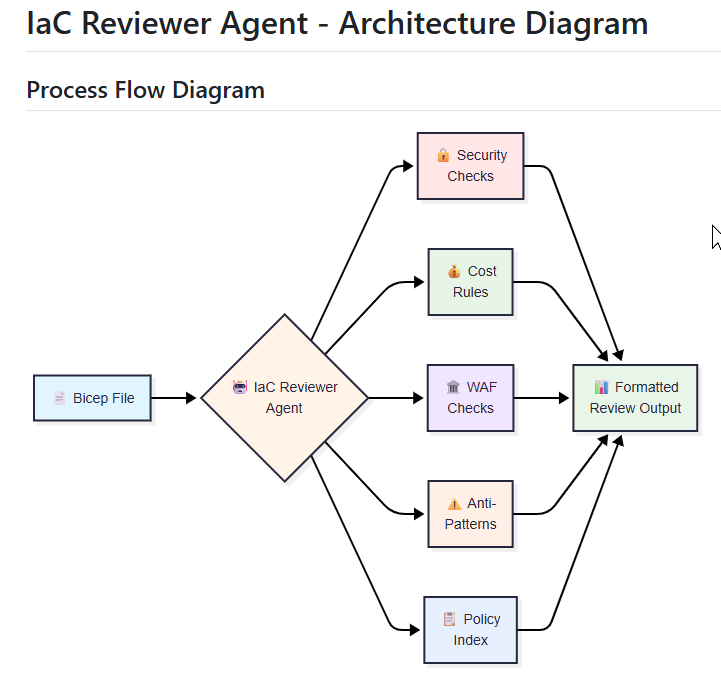
The agent is implemented as a custom mode in my VS Code workspace (using the .github/agents/ pattern I’ve written about before). When you mention it in a GitHub Copilot chat with a Bicep (or Terraform, lol) file open, it:
- Parses the IaC file - extracts resource types, properties, and dependencies
- Fetches relevant Azure Policy definitions - queries your Azure subscription (or a cached set of policies) for rules that apply to those resource types
- Checks against Well-Architected Framework - uses a knowledge base of WAF recommendations mapped to resource types
- Analyzes cost implications - estimates monthly cost using Azure Pricing API (or at least flags known expensive configurations)
- Returns inline suggestions - formatted as PR review comments you can copy-paste into GitHub
The whole thing runs in about 5-10 seconds for a typical PR with 3-5 resources.
Building the Agent: Step-by-Step
The agent lives in your repo under .github/agents/iac-reviewer/ and consists of a main agent definition plus five knowledge base files that contain all the rules.
Step 1: Set Up the Agent Structure
Here’s the complete file structure:
| |
The .agent.md file defines the agent’s behavior:
| |
The agent uses these knowledge files as its “brain” - when you ask it to review a file, it reads the relevant knowledge bases and applies the rules.
Step 2: Create the Security Checks Knowledge Base
The security-checks.md file contains security rules organized by Azure resource type. Here’s an example for Storage Accounts:
| |
- Why: Public access can leak sensitive data
- Policy: “Storage accounts should disable public blob access”
- Reference: https://learn.microsoft.com/azure/storage/blobs/anonymous-read-access-prevent
Minimum TLS version < 1.2
| |
- Why: TLS 1.0/1.1 have known vulnerabilities
- Policy: “Storage accounts should use minimum TLS version 1.2”
| |
Cost impact:
- LRS: ~$0.018/GB/month
- GRS: ~$0.036/GB/month
- Savings: ~50% for dev/test environments
When GRS is justified:
- Production data that requires disaster recovery
- Compliance requirements for geo-redundancy
| |
Geo-replication:
| |
Each WAF check explains which pillar it addresses (reliability, security, cost, operations, performance) and why it matters for production workloads.
Step 5: Document Common Anti-Patterns
The anti-patterns.md file catches mistakes that technically work but cause problems:
| |
Why it matters: Hardcoded values make code non-reusable and force copy-paste programming
This knowledge base has been a lifesaver - it catches the “works but you’ll regret it later” patterns.
Step 6: Create Azure Policy Index
The azure-policy-index.md file is a quick reference for citing policies:
| |
When the agent finds an issue, it can cite the exact policy ID and link to the definition. This is super helpful when someone pushes back on a recommendation - you can point to the official Microsoft policy.
Example: Reviewing a Storage Account Configuration
Let me show you a real example. I created a “bad” Bicep file with intentional issues to demonstrate what the agent catches:
| |
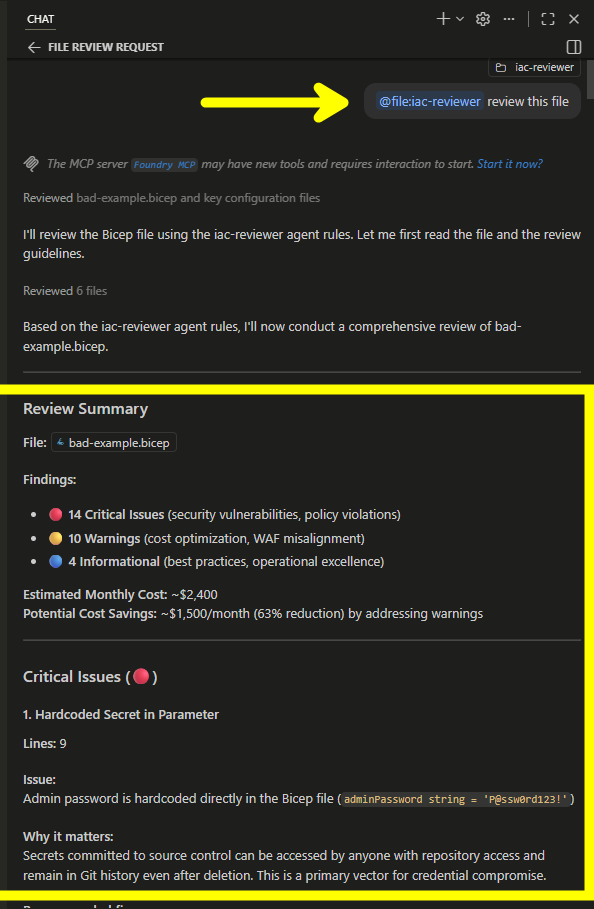
When I run @iac-reviewer review this file, the agent outputs:
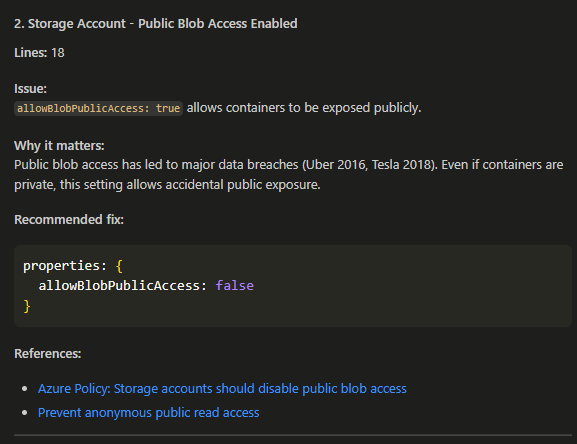
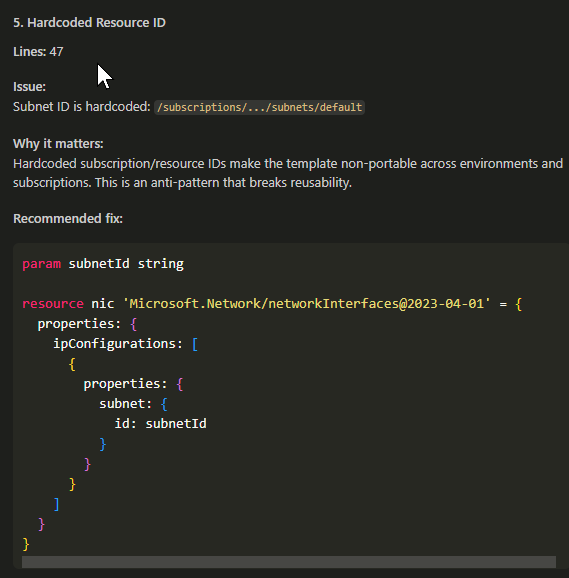
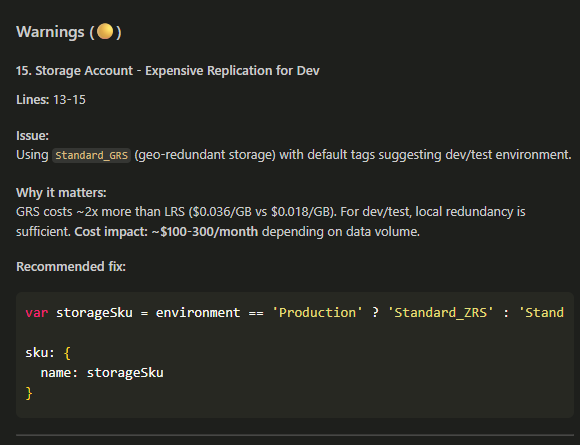
The full review output (23 issues across multiple resources) is in the examples folder of the repo.
Using the Agent
Once you’ve copied the agent folder to your repo, using it is simple:
- Open a Bicep or Terraform file in VS Code
- Open GitHub Copilot Chat (Ctrl+Shift+I)
- Invoke the agent:
@iac-reviewer review this file - Get instant feedback with prioritized findings
The agent understands context - if you ask “what can I optimize for cost?” it focuses on cost rules. If you say “check for security issues,” it prioritizes security checks.
You can also review entire PRs:
| |
Lessons Learned and Gotchas
What worked well:
- Knowledge base approach - separating rules into files makes them easy to update and maintain
- Environment-aware rules - checking the
Environmenttag to adjust recommendations (dev vs. prod) prevents false positives - Markdown output format - makes it trivial to copy-paste into GitHub PR comments
- Example files - having good vs. bad examples helps people learn the patterns
What was harder than expected:
- Avoiding false positives - some resources should use premium SKUs or public access (e.g., CDN storage). Had to add context checks.
- Keeping knowledge bases current - Azure releases new policies and features constantly. Set a monthly review reminder.
- Determining “why” - every rule needs a business justification, not just “this is the rule.” Took time to research and document.
What I’d do differently:
- Start with fewer resource types and expand gradually (I tried to cover everything at once)
- Build a test suite of Bicep files to validate agent behavior
- Add a
CONTRIBUTING.mdfor community contributions to the knowledge bases
Still TODO:
- Add support for ARM templates (JSON parsing is… less fun than Bicep)
- Integrate with GitHub Actions to auto-post review comments on PRs
- Build a feedback loop so the agent learns which suggestions get accepted vs. ignored
- Expand to more Azure resource types (Functions, Container Apps, API Management)
Get the Agent
I’ve published the complete agent with all knowledge bases and examples to GitHub:
Repository: github.com/petender/iac-reviewer-agent
Quick start:
- Clone or copy the
.github/agents/iac-reviewer/folder to your repo - Open a Bicep file in VS Code
- Run:
@iac-reviewer review this file
What’s included:
- Complete agent definition (
.agent.md) - 5 knowledge base files with 150+ rules
- Example Bicep files (good vs. bad)
- Sample review output
- Quick reference guide
- Full documentation
Want to contribute? Found a security pattern I missed? Have a cost optimization rule to add? PRs welcome! The knowledge bases are designed to be community-maintained.
Wrapping Up
This agent has already saved me (and my team) a bunch of back-and-forth on PRs, as well as Azure deployment frustrations. Instead of “Hey, can you fix the TLS version?” in a review comment three days later, we catch it locally in 10 seconds.
More importantly, it’s teaching the team Azure best practices. When the agent explains why public blob access is dangerous (with links to real breaches), people remember it. The agent becomes a learning tool, not just a linter.
The next step is to wire this up to GitHub Actions as agentic workflows, which was a topic I blogged about recently.
If you build something similar, customize the knowledge bases for your org, or have ideas for other IaC checks worth automating, ping me on LinkedIn - I’d love to hear what patterns you’re catching.

Cheers!!
/Peter